Quick answer: An AI story generator for kids writes a short story from a few choices, such as the child's name, age and theme. Look for control over theme, lesson and length, age-appropriate guardrails, and a design that encourages reading together. Always read the story first or with your child.
Free to download on iPhone. Premium plans: Monthly $4.99 or 12 Months $49.99 (local price shown in the App Store).
Screens are examples.
An AI story generator for kids is an app that writes a new story from a few simple choices. For tired parents it can be a handy extra pair of hands at the end of a long day, but not every tool is built the same way. This guide gives you a plain checklist to compare options, shows how it works in Kidzo, and ends with story ideas you can try. If you are new to the idea, start with our post on personalised bedtime stories for kids.
How does an AI story generator for kids work?
You choose a few inputs and the app writes a story from them. Behind the scenes, a large language model predicts text that fits what you picked. That is why the same choices can give a slightly different story each time, and why a grown-up should check the result. The model is a writing tool, not an expert on your child.
What should parents check before choosing one?
Use this checklist when you compare apps:
| Question | Why it matters |
|---|---|
| Can I set the child's age? | Words and ideas should fit a 3-year-old differently from an 8-year-old. |
| Can I choose theme and lesson? | You stay in charge of what the story is about. |
| Can I choose the length? | Short for a sleepy night, longer for a quiet afternoon. |
| Does it mention guardrails? | Look for a clear statement on age-appropriate content, and still read along. |
| Is the price clear? | Check what is free and what is paid before your child falls in love with it. |
| Does it encourage reading together? | Shared reading is the point of a bedtime story. |
How does Kidzo handle these things?
Kidzo (listed on the App Store as "Kidzo: Kids Stories Generator") is an iPhone and iPad app that builds a story from the child's name, age and favourite theme, with a lesson built in. It lets you pick the theme, the lesson and the story length. Kidzo says its stories use age-appropriate guardrails. It is free to try, and Premium plans are shown in the App Store; see Kidzo pricing for more. You can read how it fits together on how Kidzo works.
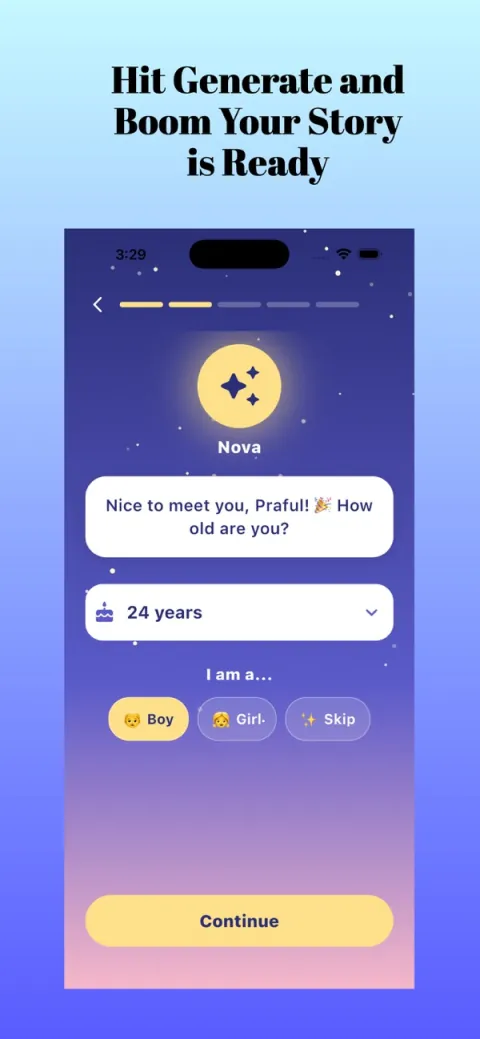
- Open Kidzo. A friendly guide named Nova asks for your child's name and age.
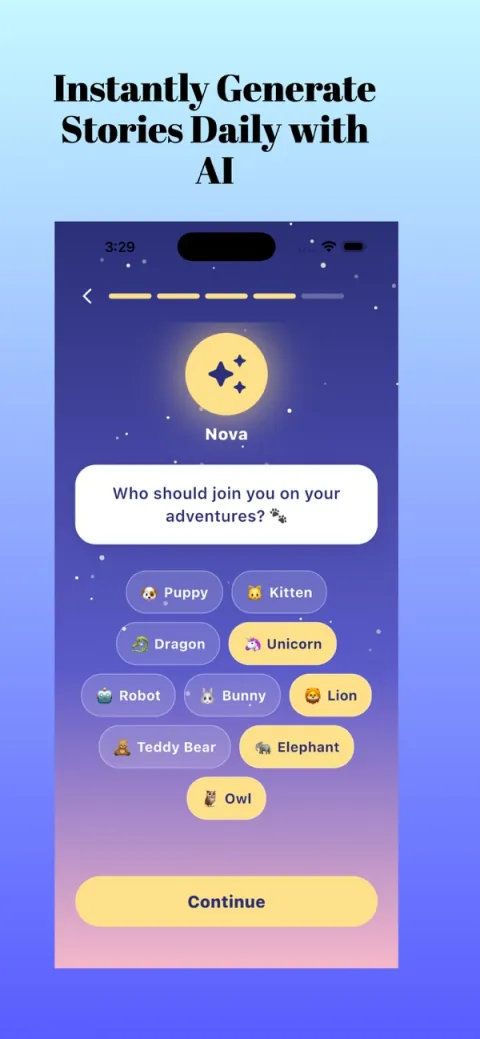
- Pick a companion for the story, such as a puppy, kitten, dragon, unicorn, robot, bunny, lion, teddy bear, elephant or owl.
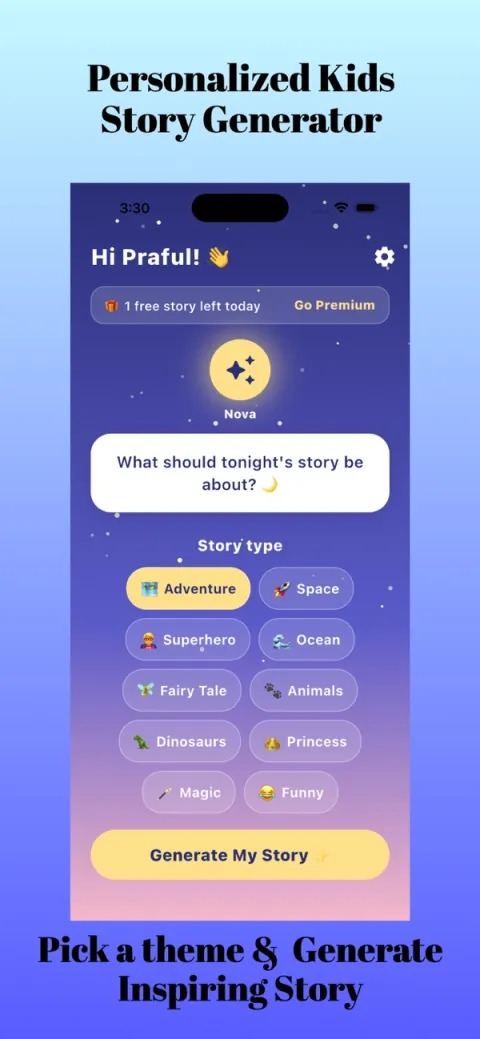
- Choose a story type or theme (for example dinosaurs, space, animals or fairy tales), and a lesson if you want one, such as kindness or courage.
- Tap Generate My Story, then read it together. Save the ones your child asks for again.
What kind of story ideas can I ask for?
Good prompts are small and specific. Try one of these:
- A shy puppy at a new playground
Choose the kindness lesson and the animals theme. Great for children starting something new. - A dragon who learns to share its treasure
Combine fantasy with the sharing lesson. Ask your child what treasure they would share. - A robot who says sorry
A funny theme with an honesty or friendship lesson. Pause and ask what the robot could do next. - A space trip to find the quietest star
A calm space story for the end of the day. Choose a short length. - A pirate who is brave in small ways
Use the courage lesson and an adventure theme. Brave can mean asking for help.
What are the limits of an AI story generator?
- It can be repetitive. Different inputs give you variety, so change the companion or theme.
- It does not know your family. It will not know the dog died last year or that a sibling is new, so you must judge each story.
- It is not a teacher. A lesson in a story is a conversation starter, not a guarantee.
- It cannot replace books. Keep visiting the library and reading favourites.
What are the common mistakes?
- Handing the phone to a child and walking away. Read together.
- Accepting the first story every time. Regenerate if it does not suit your child.
- Choosing an exciting theme right before sleep.
- Putting in private details such as a surname or school. A first name and age are enough.
How do I set up a good routine around an AI story app?
Treat the app like a book you take off the shelf. Decide in advance how many stories you will read, sit together, and put the phone away afterwards. Many families find it helpful to let the child choose the companion and the theme, since choosing is half the fun, and then keep the lesson in the parent's hands. If a story is not quite right, you can simply skip a paragraph or change a name as you read aloud. It is your story time, and the app is just a starting point.
Finally, save the stories your child asks for again. Seeing which themes come back tells you more about what your child is thinking about than any list of features.
What is a sensible way to start?
Try one story with your child while you sit together. Notice what they laugh at, ask about or want to hear again, then use that for the next theme. For more ideas, see our Kidzo guides, or explore other AppVeda apps.
Kidzo: Kids Stories Generator
Free to try on the App StoreYour child is the hero of a new bedtime story in seconds: pick a theme and a lesson. Free to try on iPhone.
Download on theApp Store App details →More from AppVeda Software
- Live in India? India AQI shows live air quality for 100+ Indian cities.
- AppVeda Software also builds AI-powered mobile apps for businesses. See all our apps.
Frequently asked questions
What is an AI story generator for kids?
An app that writes a short story from choices like the child's name, age, theme and lesson, using an AI language model.
Is an AI story generator safe for children?
Safety depends on the tool and on you. Kidzo says its stories use age-appropriate guardrails, but a parent should always read the story first or together.
How do I choose a good AI story app for my child?
Check age settings, control over theme, lesson and length, a clear price, and a design that supports reading together.
Can AI stories replace picture books?
No. They are an extra option, and shared reading of real books is still valuable.
Does Kidzo work for any age?
You enter your child's age and the app builds the story for that age group. Please read each story to check it suits your child.
About the author
Praful Deshmukh is the founder of AppVeda Software. He builds and publishes iPhone apps, including FakeSpot and Imagine. More about Praful · His apps on the App Store
 FakeSpotSpot AI-generated & fake photos
 ImagineTurn text into stunning AI art
 AI Skin ScannerScan your skin from a selfie
 India AQILive air quality for Indian cities
 AI Video DetectorIs that clip real or AI?