Home / Services / Business Workflow Automation
Workflow Automation & Integration

Business Workflow Automation and System Integration

Most businesses do not need one more app. They need the apps they already have to talk to each other. We connect your tools, databases and mobile apps so information moves on its own, approvals follow a clear path and everyone sees the same numbers.

Typical workflow problems

If two or more of these sound like your business, there is usually a quick win.

Registers and spreadsheets

Operations tracked on paper or in many Excel files that do not match each other.

Manual handoffs

Work moves between teams by phone call or WhatsApp, and things get lost in between.

No audit trail

You cannot see who approved what, when, or with what proof.

Month-end chaos

Reports for owners, auditors or government bodies take days to compile.

What we connect and automate

Only integrations we can build, run and support ourselves.

Custom dashboards & admin panels

One place to see operations live, replacing scattered sheets and registers.

  • Role-based access
  • Real-time data
  • Excel and PDF exports

System integrations

Connect CRMs, accounting, ERPs, payment gateways and your own apps through their APIs.

  • REST APIs and webhooks
  • Google Sheets and Excel
  • Payment gateways

WhatsApp workflows

Receipts, confirmations, reminders and status updates sent automatically over WhatsApp.

  • WhatsApp Business API
  • Template messages
  • Two-way updates

Approval & verification flows

Structured approval queues with evidence uploads, timestamps and a full audit log.

  • Multi-level approvals
  • Photo and document evidence
  • Audit-ready exports

Field & staff apps

Mobile apps for drivers, trainers or field staff that feed data straight into your dashboard.

  • Offline-friendly
  • GPS and photo capture
  • Push notifications

AI where it helps

Add AI steps such as document reading or enquiry classification inside the workflow, with human checks.

  • Document extraction
  • Smart routing
  • Plain-language reports

How a project runs

Small first release, measured, then expanded. No big-bang rollouts.

Discover

A 30-minute call to map the process, who touches it and where time is lost.

Design

We propose the smallest useful solution, with a fixed scope and clear success measure.

Build

Working software in short cycles. You see progress every week, not at the end.

Integrate

Connect it to the tools and data you already use. Train your team on it.

Improve

Review real usage, fix what is slow or wrong, then automate the next step.

Proof from our own work

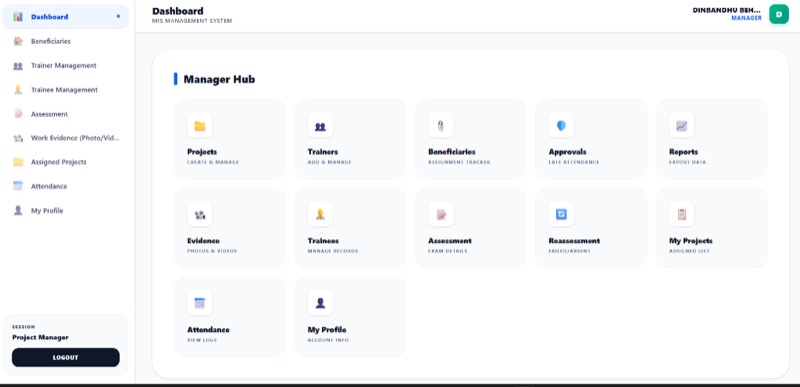
Government worker management MIS portal
Real project

Government Worker Management Portal

For a government skill-training programme, trainee rosters, attendance, assessments and photo/video evidence were managed manually across centres. We built a central MIS and Manager Hub with approval queues, evidence uploads with timestamps and one-click Excel exports for auditors, so regional managers can verify and report without chasing centres for paperwork.

Read the project story →

Frequently asked questions

What is business process automation?

It means using software to carry out repeatable steps of a process, such as moving data, sending notifications or routing approvals, so people only handle the parts that need judgement.

Can you connect our existing tools instead of replacing them?

Yes, that is our default. If a tool has an API or export, we can usually connect it. We only suggest replacing a system when it blocks the workflow entirely.

Do you use Zapier or Make, or build custom?

Both are possible. Off-the-shelf tools are quick for simple flows; custom integrations are better when volume, security or complex logic matter. We recommend based on your case and running cost.

Can you build an ERP or MIS for our operations?

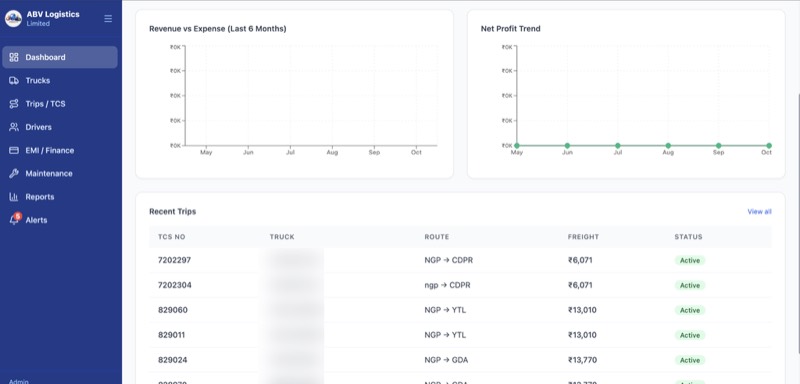
Yes. We have built a transport ERP for a logistics company, a gym management system and a government MIS portal. Each was designed around the client's actual workflow.

Who maintains the system after launch?

We offer ongoing support and improvement plans, and you receive full documentation and source code so your own team can maintain it if you prefer.

Is this only for large companies?

No. Many of our clients are small and medium businesses. Starting with one workflow keeps the first project small and affordable.
Tell us what you want to improve

Answer four short questions. We reply on WhatsApp or email, usually the same working day, with honest feedback on whether AI or automation is the right fit.

  • Free 30-minute consultation call
  • No sales pressure, no long forms
  • We tell you if a simpler, non-AI fix will do
2. What do you need?
3. Where is your business?

Submitting opens WhatsApp with your answers so you can send them to our team.

Related solutions

Most projects combine two or three of these.