Quick answer: Personalised bedtime stories put your child at the centre: their name, age and favourite things appear in the tale. Many children listen more closely when the hero is them. With Kidzo you enter a name and age, pick a theme and a lesson, and read the result together.
Free to download on iPhone. Premium plans: Monthly $4.99 or 12 Months $49.99 (local price shown in the App Store).
Screens are examples.
Personalised bedtime stories are stories written around one particular child. The hero has your child's name, the setting is something they love, and the small lesson at the end fits the week they are having. If you have ever changed the name in a picture book to your child's, you already know the idea. This guide explains why it feels special, how to make one yourself or with Kidzo, and gives you story starters for tonight.
What makes a bedtime story personalised?
A personalised story has three parts you can adjust: who it is about, what it is about and why it matters. Who is your child, often with a companion such as a puppy or a dragon. What is the theme, for example dinosaurs, space or an ocean adventure. Why is a gentle lesson such as kindness, courage, honesty or sharing. Our overview of personalised bedtime stories covers the same ideas in a shorter format.
Why do children enjoy being the hero?
We do not need a study to see what parents notice: a child who hears their own name in a story sits up. It makes the story feel like it is happening to them, and it gives you an easy way to talk about real feelings from a safe distance. "What did Mia do when the dragon felt shy?" is often easier to answer than "Were you shy at school today?"
It also keeps the story close to what your child already loves. A four-year-old who talks about diggers all day will follow a story about a brave digger far longer than a story about something chosen by an adult.
How can I make a personalised bedtime story at home?
You can do this with no app at all. Choose a name, a place, a problem and a kind ending, then tell it slowly. A short recipe:
- Start with your child's name and a place they know, such as the garden or the park.
- Add one companion, a toy or an animal, who needs a little help.
- Give the story one small problem, such as a lost balloon or a shy new friend.
- Let the hero solve it with something your child can copy, like asking for help or sharing.
- End quietly, with the hero back home and ready to rest.
If you would like a ready first draft, an app can do the typing for you. That is where Kidzo fits in.
How do I make one with Kidzo?
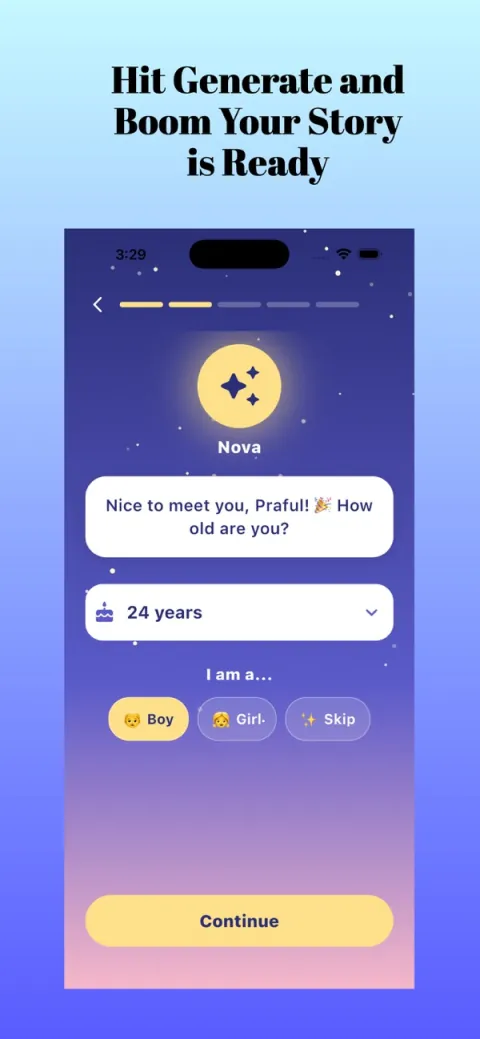
- Open Kidzo. A friendly guide named Nova asks for your child's name and age.
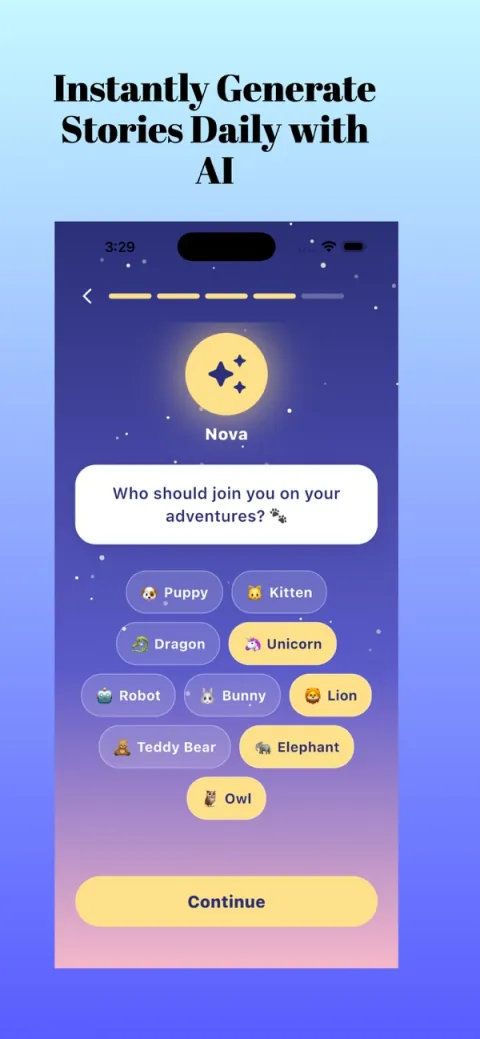
- Pick a companion for the story, such as a puppy, kitten, dragon, unicorn, robot, bunny, lion, teddy bear, elephant or owl.
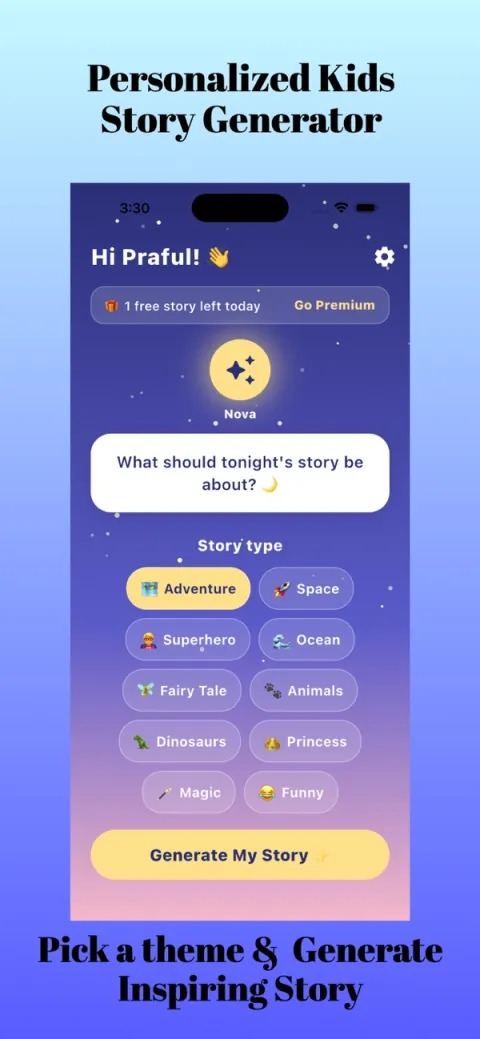
- Choose a story type or theme (for example dinosaurs, space, animals or fairy tales), and a lesson if you want one, such as kindness or courage.
- Tap Generate My Story, then read it together. Save the ones your child asks for again.
You choose the theme (fairy tales, dinosaurs, space, animals, princesses, pirates, fantasy, adventure, superhero, ocean, magic or funny), the lesson (kindness, courage, honesty, friendship, sharing or gratitude) and the story length, so you can match the evening. See how Kidzo works for the details.
Kidzo is free to try, and Premium plans are shown in the App Store. Stories are made with AI, so read each one yourself first or together with your child, and change anything that does not feel right for your family. Kidzo says its stories use age-appropriate guardrails, but a parent reading along is always the best check.
What are some personalised story starters to try tonight?
Use these as prompts for a story you tell yourself, or as ideas to pick in the app. Replace the name with your child's.
- Mila and the sleepy dinosaur
A small dinosaur cannot find its nest, and Mila walks it home. Good for animal lovers and a gentle ending. - Leo, the astronaut who shared his snack
Leo meets a new friend on the moon who forgot their lunch. A kind way to introduce sharing. - Ava and the brave little dragon
The dragon is afraid of its own sneeze. Ava shows that being a bit scared is normal. - Sam finds the honest bunny
A bunny breaks a flower pot and decides to tell the truth. A soft start to talking about honesty. - Noor and the ocean lantern
A glowing fish helps Noor find a lost sea turtle. A calm, watery adventure. - Kenji and the robot who learned thank you
A robot practises saying thank you to everyone it meets. Easy to link to gratitude.
What are the common mistakes?
- Making it too exciting. At bedtime, pick calm themes and a quiet ending.
- Not reading it first. Skim an AI story before you read it aloud, or read it together as it appears.
- Using the story as a lecture. Let the lesson sit inside the plot and ask one gentle question at the end.
- Expecting a perfect story every time. Regenerate or edit it in your head as you read.
Are personalised bedtime stories right for every child?
Most children enjoy hearing their own name, but not all do. Some children prefer a favourite character they already know, and that is perfectly fine. Watch your child's reaction. If they giggle and ask for more, carry on. If they seem unsure, try a story about a made-up friend first and bring your child in later as a helper. You can also mix: read a familiar picture book most nights and add a personalised story once a week as a treat.
It also helps to think about what you want from the moment. If the goal is calm, pick a slow theme. If the goal is a chat about a hard day, choose a lesson that matches. There is no wrong answer, and you can change your mind from one evening to the next.
What should I remember?
A personalised story is a small, kind way to spend a few minutes together. It is not a replacement for books, and it makes no promises about sleep or learning. More ideas are in our Kidzo guides, and you can browse other AppVeda apps from the same team.
Kidzo: Kids Stories Generator
Free to try on the App StoreYour child is the hero of a new bedtime story in seconds: pick a theme and a lesson. Free to try on iPhone.
Download on theApp Store App details →More from AppVeda Software
- Live in India? India AQI shows live air quality for 100+ Indian cities.
- AppVeda Software also builds AI-powered mobile apps for businesses. See all our apps.
Frequently asked questions
What are personalised bedtime stories?
Stories written around a particular child, using their name, age and favourite things so that they are the hero. You can tell one yourself or use an app such as Kidzo to draft one.
Can I make a personalised bedtime story for free?
Yes, you can invent one at home with a name, a place, a small problem and a kind ending. Kidzo is free to try, and Premium plans are shown in the App Store.
What age are personalised stories good for?
Toddlers enjoy very short ones with their name and a favourite animal. Older children like longer plots with a lesson. Kidzo lets you enter the child's age and choose the story length.
Are AI-written stories safe for kids?
Kidzo says its stories use age-appropriate guardrails, but no tool is perfect. Read the story first or together and change anything you are unsure about.
Do personalised stories help children sleep?
We make no sleep claims. A calm story can be a pleasant part of a routine, but every child is different, so speak to your doctor about sleep concerns.
About the author
Praful Deshmukh is the founder of AppVeda Software. He builds and publishes iPhone apps, including FakeSpot and Imagine. More about Praful · His apps on the App Store
 FakeSpotSpot AI-generated & fake photos
 ImagineTurn text into stunning AI art
 AI Skin ScannerScan your skin from a selfie
 India AQILive air quality for Indian cities
 AI Video DetectorIs that clip real or AI?